Ever felt like your precious photos are being held hostage by subscription services? Or perhaps you’re tired of compression algorithms butchering the quality of your carefully composed shots? Well, pull up a chair, because I’ve just spent a week with Piwigo – the open-source free photo gallery solution that might just liberate your digital memories.
Let me be clear from the outset – I didn’t expect to fall for Piwigo. I approached this review thinking, “Great, another photo management system to fiddle with for a week and then forget about.” But here I am, already migrating my personal collection to it. Oops.

What on Earth is Piwigo?
Piwigo is an open-source photo gallery platform that lets you showcase, organise, and share your images online. It’s been around since 2002 (originally called PhpWebGallery), which in internet years makes it practically ancient. But unlike that embarrassing website you built in 2002, Piwigo has aged rather well.
Think of it as WordPress, but specifically designed for photos and images. You get a familiar dashboard, themes, plugins, and user management – but everything is laser-focused on making your visual content shine.
The kicker? It’s completely free. As in £0. As in “why-haven’t-I-heard-of-this-before” free.
For those who don’t fancy the technical faff of self-hosting, services like 365i offer Piwigo pre-installed and ready to go (more on that brilliant option later).

Who Needs Piwigo in Their Life?
- Photographers who want to showcase their work without paying extortionate portfolio site fees
- Families looking to share photos privately without surrendering their data to the social media overlords
- Small businesses needing to maintain product image libraries
- Clubs and communities wanting a central place for members to share photos
- Anyone with a substantial image collection who’s fed up with the limitations of cloud storage services
If you’ve ever muttered “I wish I owned my photos rather than renting space for them,” then Piwigo is speaking your language.
Standout Features That Made Me Raise an Eyebrow (In a Good Way)
When I started exploring Piwigo, several features genuinely impressed me:

1. Total Control Without Technical Nightmares
The dashboard feels surprisingly familiar if you’ve ever used WordPress. There’s that same left-sidebar navigation, clean interface, and logical organisation. I was uploading photos within minutes – no head-scratching or frantic Googling required.
This ease of use reminds me of the principles discussed in our 10 Top Tips for Web Design Success in 2025 article. Interface familiarity matters tremendously for user adoption.

2. Impressive Album Organisation
Creating albums, sub-albums, and virtual albums (that reference photos without duplicating them) is both intuitive and powerful. You can tag, categorise, and describe your images with metadata that would make a librarian swoon.
Albums can be private, public, or shared with specific users – perfect if you want to create a VIP section for certain clients or family members.

3. Multi-User Management That Actually Works
Most photo platforms either don’t offer multi-user functionality or make it so convoluted it’s practically useless. Piwigo gets it right with clean user management:
- Create different access levels (admin, family, friends, etc.)
- Allow certain users to upload to specific albums
- Control who can download original images
This makes it perfect for collaborative projects or family photo sharing where not everyone needs admin access.
4. Advanced Search Capabilities
After uploading a decent batch of photos, I was blown away by the search functionality. You can search by:
- Date (taken or uploaded)
- Tags and categories
- EXIF data (camera model, aperture, etc.)
- Author or uploader
As someone who regularly loses track of specific images in my collection, this feature alone feels worth the setup time.
5. Mobile-Ready Without Sacrificing Features
The responsive themes mean your gallery looks great on everything from ultrawide monitors to mobile phones. I tested it on three different devices and was genuinely impressed by how well it adapted.
In an era where responsive design is crucial (as we explained in our Mastering Global Fonts in Elementor guide), Piwigo delivers without fuss.
The Alternatives (And Why They’ll Cost You More)
Before committing to Piwigo, I looked at the competition. Here’s how the alternatives stack up price-wise:
| Platform | Starting Price | Storage Limits | Notable Limitations |
|---|---|---|---|
| SmugMug | £7/month | Unlimited | Limited themes, no free tier |
| Zenfolio | £5/month | 15GB on basic plan | Template restrictions |
| Flickr Pro | £6.99/month | Unlimited | Social focus, less control |
| 500px | £3.99/month | Unlimited uploads | Focuses on selling photos |
| Adobe Portfolio | £9.98/month | 20GB (with Photography plan) | Requires Creative Cloud subscription |
| Piwigo | FREE | Limited only by your hosting | None (besides hosting costs) |
“The true cost of ‘free’ photo services is rarely measured in currency, but in the rights you sign away and the compression applied to your work.” – Digital Photography Review
When you factor in that a basic hosting package with 365i’s Piwigo hosting starts at just a fraction of these monthly subscription costs, the math becomes compelling.
My Experience: From Installation to First Gallery
Getting Started
I opted to test Piwigo through 365i’s one-click installation, which was embarrassingly simple. Click, configure a few basic settings, and boom – my gallery was live.
The alternative – manual installation – isn’t particularly difficult either (download, upload to server, run installer), but the pre-installed route saved me valuable time.
The Dashboard: Familiar Territory
If you’ve ever used a content management system, you’ll feel right at home. The dashboard presents a clean overview of your gallery statistics, recent uploads, and quick access to common tasks.
What impressed me was the performance – even with a modest hosting package, the admin area felt snappy and responsive. This aligns perfectly with what we discuss in our article about WordPress Turbo Hosting to Supercharge Your Website – good architecture makes a huge difference in responsiveness.
Uploading: Multiple Options for Different Needs
Piwigo offers several ways to get your photos into your gallery:
- Web uploader: Drag and drop through your browser
- pLoader: A dedicated desktop application for bulk uploads
- Mobile apps: Native apps for iOS and Android
- FTP: For the power users wanting to transfer massive archives
I tested the first three methods, and all worked flawlessly. The web uploader handled a batch of 200 high-res photos without complaint, automatically generating thumbnails and respecting my folder structure.

Albums and Organisation
Creating a logical structure for my test photos took minutes rather than hours. The ability to create virtual albums that reference already uploaded photos (without duplication) saved tremendous storage space and made organising by multiple criteria simple.
What really shines is how Piwigo handles metadata. It preserves EXIF data, allows batch tagging, and makes reorganising content a breeze.
Themes and Customisation
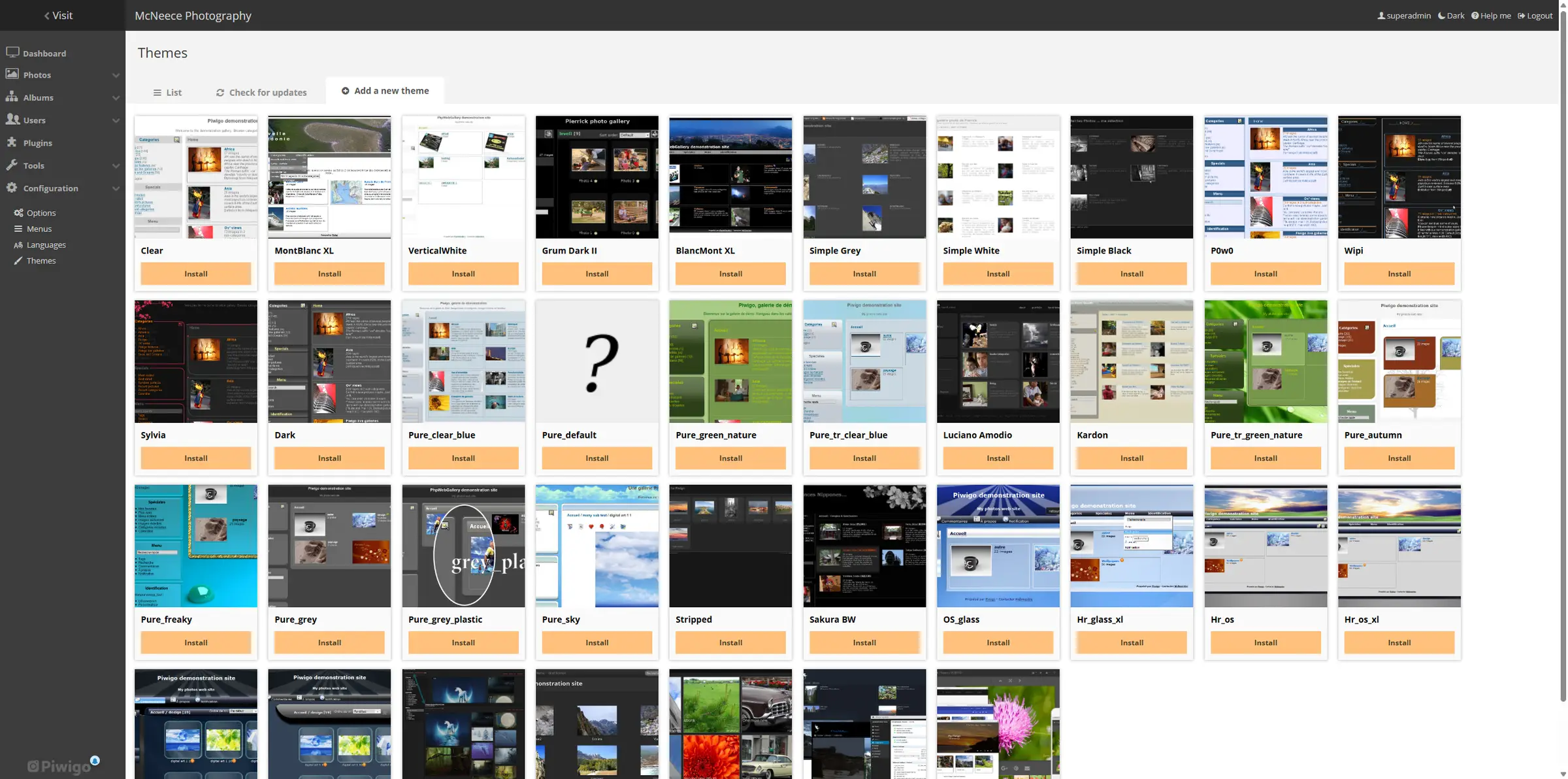
Out of the box, Piwigo offers several responsive themes that look surprisingly modern. I was expecting dated designs given its long history, but the default options would satisfy most users.
For those wanting more control, theme customisation is straightforward with basic CSS knowledge. If you’re looking for inspiration on modern design approaches, our article on Neomorphism Design: A Complete Guide to the Future of Web UI might give you some ideas to apply.

Plugins Extend Functionality
The plugin ecosystem isn’t as vast as WordPress, but it covers all the essentials:
- VideoJS for video support
- Comments and social sharing
- Advanced galleries and sliders
- Statistics and visitor tracking
- Additional upload tools
Most plugins installed without a hitch, though I did encounter one compatibility issue with an older plugin that hadn’t been updated for the latest Piwigo version.

The Honest Pros and Cons
Let’s cut to the chase – here’s what’s brilliant and what’s less than perfect about Piwigo.
The Good Stuff
- Complete ownership of your photos and data
- No subscription fees – just hosting costs
- Surprising speed even with large galleries
- Powerful organisation tools for serious collections
- Flexible privacy controls for different user groups
- No compression of your original images
- Regular updates and security patches
- Active community for support and plugins
The Not-So-Great Bits
- Initial setup curve if you’re not technically inclined
- Some plugins lack polish compared to commercial platforms
- Limited built-in editing tools (though you can integrate with external editors)
- Mobile apps function well but lack some of the polish of dedicated photo services
- Community support rather than professional customer service (unless you choose a managed hosting option)

Why 365i Makes Piwigo Even Better
After testing both self-hosted and the 365i hosted Piwigo option, I’m firmly in the hosted camp. Here’s why:
- One-click installation saves hours of configuration
- Optimised server environment specifically tuned for image handling
- Automatic updates so you don’t miss critical security patches
- Technical support from people who actually understand Piwigo
- Scalable resources as your gallery grows
- Regular backups keeping your precious memories safe
In many ways, this mirrors what we discuss in our Ultimate WordPress Support & Maintenance Plan – managed solutions remove the technical burden and let you focus on what matters: in this case, your photography.
“Self-hosting gives you freedom, but managed hosting gives you freedom AND peace of mind. Sometimes the small additional cost saves exponentially more in time and frustration.” – Web Hosting Magazine

Final Thoughts: I’m Actually Keeping This One
I’ve reviewed dozens of web applications over the years. Most get uninstalled the moment the review is complete. Piwigo is different – it’s staying on my server.
The combination of ownership, flexibility, and surprising ease of use has convinced me to migrate my sprawling collection of family photos from their current cloud-based prison. No more monthly fees, no more compression, no more wondering if my service will change their terms or shut down.
The fact that I can give grandparents limited access to family albums while keeping client work completely separate in the same system is exactly what I’ve been looking for.
If you’re serious about photography or simply have a large collection of images that deserve better treatment than they’re currently getting, Piwigo deserves your attention. And if you want the smoothest experience, the 365i hosted option removes virtually all the technical barriers.
Key Takeaways
- Open-source and free: Piwigo itself costs nothing, you only pay for hosting (which can be as little as a few pounds per month).
- Total ownership: Unlike commercial alternatives, you retain complete control over your images, with no compression or rights issues.
- Surprisingly user-friendly: Despite its powerful features, the learning curve is gentle thanks to a familiar WordPress-like interface.
- Flexible privacy: Create public galleries, private collections, or anything in between with granular user permissions.
- Community support: A passionate user base creates plugins, themes, and provides help through active forums.
- Mobile-ready: Responsive themes and dedicated apps make your gallery look great on any device.
- Managed hosting benefits: Services like 365i remove technical barriers with one-click installation, optimization, and support.
In a world where our digital memories are increasingly held captive by subscription services and social platforms, Piwigo stands as a reminder that there’s another way – one where you remain firmly in control of your visual legacy.
Interested in other open-source alternatives to commercial services? Check out our BuddyPress Review 2025 for a look at how to create your own social network or our AbanteCart Review if you’re considering an e-commerce solution. And if you’re looking for more ways to optimize your web presence, our guide on How to Improve E-E-A-T provides valuable insights for creating content Google respects.
Need help setting up your own Piwigo installation or other web applications? Contact McNeece Web Design at 07785 326603 or email support@mcneece.com for expert assistance.