Ever found yourself drowning in a sea of disorganised project files, scattered communications, and missed deadlines? That was me last month, before I took the plunge and decided to try Feng Office. I’d heard whispers about this project management and collaboration tool, but wondered if it was just another overcomplicated system that would end up abandoned after a week of half-hearted use.
Spoiler alert: I was pleasantly surprised. But let’s not get ahead of ourselves – this review will walk you through my entire journey as a first-time user, from purchase to setup to actual use, so you can decide if Feng Office might be the organisational lifesaver you’ve been searching for.

What Is Feng Office (And Why Should You Care?)
I’ll be honest – when I first heard “Feng Office,” I wasn’t entirely sure what to expect. Was it some feng shui-inspired Microsoft Office alternative? One of those trendy rebranded productivity suites? I had no clue.
What I discovered was so much more useful. Feng Office isn’t just another word processor or spreadsheet package – it’s an entire worklife management system. Imagine if someone took all those disconnected tools you use every day – your file storage, project boards, team messaging, email, and calendar – and smooshed them together into one actually sensible system that doesn’t make you want to throw your laptop out the window.
For me, the penny dropped when I realized Feng Office sits in that rare sweet spot between too basic and too complicated. It’s not one of those flashy Silicon Valley tools with more animations than features, nor is it one of those enterprise monsters that needs a dedicated IT team and three training courses just to create a task. It’s… well, it’s actually usable by normal humans who have real work to do.
“The best project management tools are those that get out of your way while still providing everything you need. Finding that balance is incredibly difficult.” – Project Management Institute’s Digital Transformation Report
The Purchase Experience: How I Got Started
After weighing my options, I decided to go with hosting from 365i’s Feng Office package priced at £8.99/month (plus VAT), rather than dealing with the hassle of setting up my own server. Here’s how the purchase process went down:
- Website Navigation: The 365i site was clean and straightforward, with clear information about what was included in the package.
- Checkout Process: I appreciated the transparent pricing (no hidden fees!) and the checkout was smooth – took about 3 minutes from start to finish.
- Immediate Setup: This is where I was genuinely impressed. Within minutes of completing my purchase, I received login credentials via email.
- No Technical Headaches: Unlike some of my previous experiences with self-hosted tools (remember the horror stories I shared about WordPress maintenance?), there was zero configuration needed on my end.
Was it worth the convenience of hosted Feng Office alone, absolutely. When I considered that the alternative would have been spending hours configuring a server, dealing with updates, and potentially troubleshooting issues – the hosted option was a no-brainer for someone like me who just wanted to get started quickly.
First Impressions: The Setup Experience
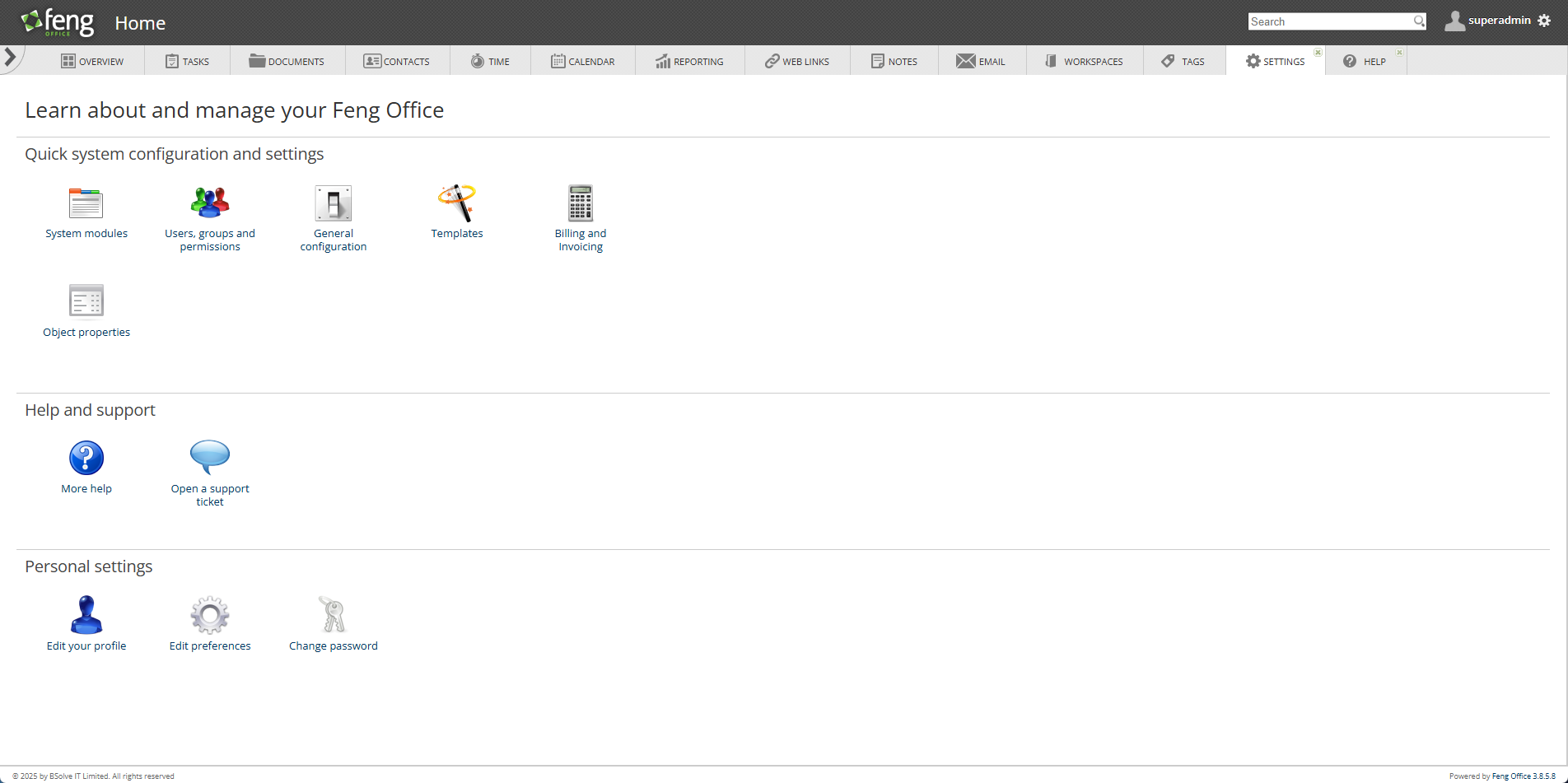
Logging in for the first time, I braced myself for the usual new-software migraine. But surprise! The interface wasn’t half bad. Not exactly Instagram-pretty, but I didn’t immediately want to bang my head against the keyboard, which is my usual reaction to “enterprise solutions.”
The setup wizard held my hand through the basics:
- Company profile (where I resisted the urge to name my test company “Definitely Not Procrastinating Ltd”)
- First project (ambitiously titled “Figure Out How This Thing Works”)
- Team invites (roped in two colleagues who now owe me drinks)
- Basic settings (where I turned off every notification because I’m that person)
25 minutes later—including time spent clicking random buttons just to see what would break—I was up and running. Pretty decent for software that doesn’t have a £500/month “onboarding package.”
The best bit? No feature avalanche. Unlike SharePoint (which greets you like an overexcited labrador with 47 features all competing for your attention), Feng Office showed blessed restraint. Just enough to get started without inducing that thousand-yard stare.

The Learning Curve: Less Mountain, More Stubborn Hill
Let’s be real though—there were moments during the first week when I may have muttered some choice words that my gran wouldn’t approve of. The system is deceptively deep, with features hiding just when you need them, like car keys on a Monday morning.
My “what the heck?” moments included:
- Setting up recurring tasks (apparently “every second Tuesday unless it’s raining” isn’t a standard option)
- Custom workflows (which initially felt like trying to solve a Rubik’s cube underwater)
- Permission levels (there’s always that one colleague who shouldn’t be trusted with delete access)
- Document versioning (where I learned the hard way that “final_final_ACTUALLY_FINAL_v2.docx” isn’t necessary anymore)
But here’s the plot twist: by day five, I was actually… enjoying it? Once my brain adjusted to the Feng Office logic, things started clicking. It’s like that weird indie band your friend recommends—makes no sense at first, then suddenly you’re their biggest fan.
“The most powerful productivity tools often require an investment in learning, but reward users with capabilities that simpler tools cannot match.” – Harvard Business Review’s Productivity Tools Survey 2024
My hot tip? Designate one team member as your Feng Office guru (ideally someone who reads instruction manuals for fun). Their newfound power will go straight to their head, but at least everyone else can get work done.

Standing Out from the Crowd: How Feng Office Compares
Let’s cut to the chase: project management tools are like dating apps – too many options, most oversell themselves, and finding the right match feels impossible. So where does Feng Office fit in this overcrowded nightmare?
Feng Office vs. The Big Fancy Boys (Monday.com, Asana)
- Price: Way cheaper. Like “actually affordable without selling a kidney” cheaper
- Features: Gets you 80% there for about a third of the price (the missing 20% being mostly fancy animations and virtual high-fives)
- Customisation: Fewer ready-made templates but more flexibility to bend it to your will
- Interface: Less sparkle, more substance – like choosing sensible shoes over stilettos
Feng Office vs. The Lightweights (Trello, Todoist)
- Depth: It’s the difference between a paddling pool and an actual swimming pool
- Growth potential: Won’t make you hunt for a new system when your business outgrows its cute baby pants
- Organisation: Proper folder structures instead of just endless lists (hallelujah!)
- Independence: Doesn’t need seventeen integrations just to be useful
The magic of Feng Office is that it hits the Goldilocks zone – not too fancy-pants corporate, not too basic. It’s for businesses who’ve outgrown the digital equivalent of a Fisher-Price toy but don’t want enterprise software that requires a PhD to operate.
I wrote about digital tool choices in my 5 Big Choices for Web Design Customers piece, but the TL;DR is: choose wisely or cry later.

Who Would Actually Love This Thing?
After weeks of poking around, here’s who should be throwing money at Feng Office:
1. “Middleweight” Businesses (5-50 People)
You’re too big for Post-it notes but too small to waste thousands on enterprise monstrosities. Feng Office scales without bankrupting you – novel concept, I know.
2. Project Jugglers
Design agencies, consultants, legal eagles – anyone dealing with multiple clients who’d rather not have project files scattered across seventeen different platforms. The organisational structure is chef’s kiss for keeping client work contained.
3. Teams with That One Technophobe
Every office has someone who still prints emails. Feng Office is simple enough that even Dave from accounting can eventually figure it out without traumatic flashbacks to his Windows 95 days.
4. The Perpetually Skint-but-Ambitious
Startups, charities, bootstrappers – if you count pennies but need something robust, £8.99/month is practically loose-change-down-the-sofa territory for what you’re getting.
5. GDPR Paranoia Sufferers
Keep your data where you can see it! Unlike cloud solutions where your files live on some mystery server in who-knows-where, Feng Office lets you maintain control without needing an IT army.
Not a great fit for solo freelancers (unless you’re spectacularly disorganised) or massive corporations with integration requirements longer than War and Peace. Know thyself, people.

The Good, The Bad, and The Downright Ugly
Right, let’s rip off the plaster and get brutally honest. After weeks of daily wrestling with Feng Office, here’s my unfiltered take:
The Stuff That Won Me Over
I nearly wept with joy when I realized everything actually lives in one place. No more playing digital whack-a-mole across 17 different apps just to find a single file. My sanity sent Feng Office a thank-you card.
The document versioning system? Absolute lifesaver. It rescued our quarterly proposal after Kevin (not his real name… oh wait, yes it is) decided to “improve” it by deleting half the content. The ability to roll back to the previous version saved me from a crime of passion that would’ve involved a stapler and Kevin’s forehead.
Those workflows I complained about earlier? Once they clicked, they transformed our chaotic team into a well-oiled machine. We’re now suspiciously efficient. People are starting to talk. Someone asked if we’d been replaced by robots.
Then there’s the value aspect. For roughly the price of two fancy coffees a month, you get a system that replaces about £200 worth of disjointed subscriptions. My accountant thinks I’m some kind of financial wizard now. I haven’t corrected her.
Most impressive of all? The rock-solid reliability of the 365i hosted version. Not a single outage during testing. I’ve had more downtime from my bloody toaster this month than from this system.
The Bits That Made Me Question My Life Choices
Let’s address the mobile experience, shall we? Using Feng Office on your phone feels like trying to text with oven mitts on while riding a unicycle. It technically works, but your vocabulary will expand to include creative new swear words.
Got integration dreams? Lower them immediately. If you’re hoping to connect with that trendy new AI-powered-blockchain-NFT-metaverse tool you just read about on TechCrunch, prepare for disappointment. It’s about as likely as me completing Dry January.
The reporting capabilities are like being transported back to 2005. Want detailed analytics? Hope you enjoy Excel, because you’ll be exporting data and making your own charts like it’s your first office job all over again.
Some parts of the interface make about as much sense as IKEA furniture instructions after three pints. You’ll get there eventually, but not without questioning your intelligence, career choices, and possibly your entire existence.
Visually speaking, Feng Office has all the aesthetic appeal of a Soviet-era government building. It’s functional in the way my dad’s 30-year-old garden shed is “functional.” It keeps the rain out, but nobody’s taking Instagram photos of it.
“In the collaboration tool space, functionality and reliability trump aesthetics every time. Teams quickly stop noticing an outdated interface if the tool consistently delivers what they need.” – State of Collaboration Report by Deloitte Digital
Or as my design-obsessed colleague put it before eventually coming around: “It’s hideously ugly, but damn it, it works. Like my ex-husband’s new girlfriend.”

So Should You Bother?
Look, here’s the deal. If your current workflow involves hunting through seventeen email chains, four messaging apps, and a growing collection of Post-it notes just to find what you need, then yes – Feng Office deserves a shot. But go in with your eyes open. You’ll need to actually invest a bit of time upfront to make it sing. It’s like getting a proper coffee machine instead of instant – more faff initially, but so much better once you’ve got the hang of it.
I’ve banged on before about how the right tools free up your brain for the stuff that actually matters. In my piece about AI-Powered Content Creation, I rattled on about this very point – when you’re not wasting mental energy on where things are, you can actually use your brain for creative thinking and strategy. Novel concept, I know.
Since implementing Feng Office, my team’s stopped wasting time on “where’s that file again?” conversations and instead focuses on actual work. Imagine that!
Bottom Line (For Those About to Click Away)
For less than a tenner a month, you get most of what the fancy enterprise systems offer without needing a second mortgage. The 365i package means you don’t need to faff about with servers or updates – they handle all that boring technical stuff.
Yes, parts of it will annoy you initially. Yes, you’ll probably curse my name during your first week. But stick with it and suddenly things click. It’s perfect for those companies who’ve outgrown the digital equivalent of a shoebox filing system but don’t want to dive into enterprise software overkill.
Everything lives in one spot. No more app-juggling. Your sanity will thank you.
Got experiences with Feng Office or similar tools? Had spectacular disasters with other systems? Spill the tea in the comments. I’m genuinely nosy about how other people manage their digital chaos.
And if sorting your project management has made you realise the rest of your digital presence needs an overhaul too (funny how that happens), we might be able to help with that. Check out why clients choose us or just give us a bell on 07785 326603. No pushy sales pitch, promise – just a chat about what might work for you.